
Today I’m diving into what normals are in the 3D world. After finishing formal education in 3D art, I actually graduated still not understanding what normals are, other than “normal maps fake details!” (we will get to those later, don’t worry). I learned much later that a “normal” refers to multiple things and affects the surface shading and appearance. Also, despite facing “reversed normals” in school, I never questioned what it meant. I just thought that a shaded face = good or unshaded face = bad. If unshaded, reverse it.
If you’re feeling lost like I was, please read along and learn about the basics of normals!
What are Normals?
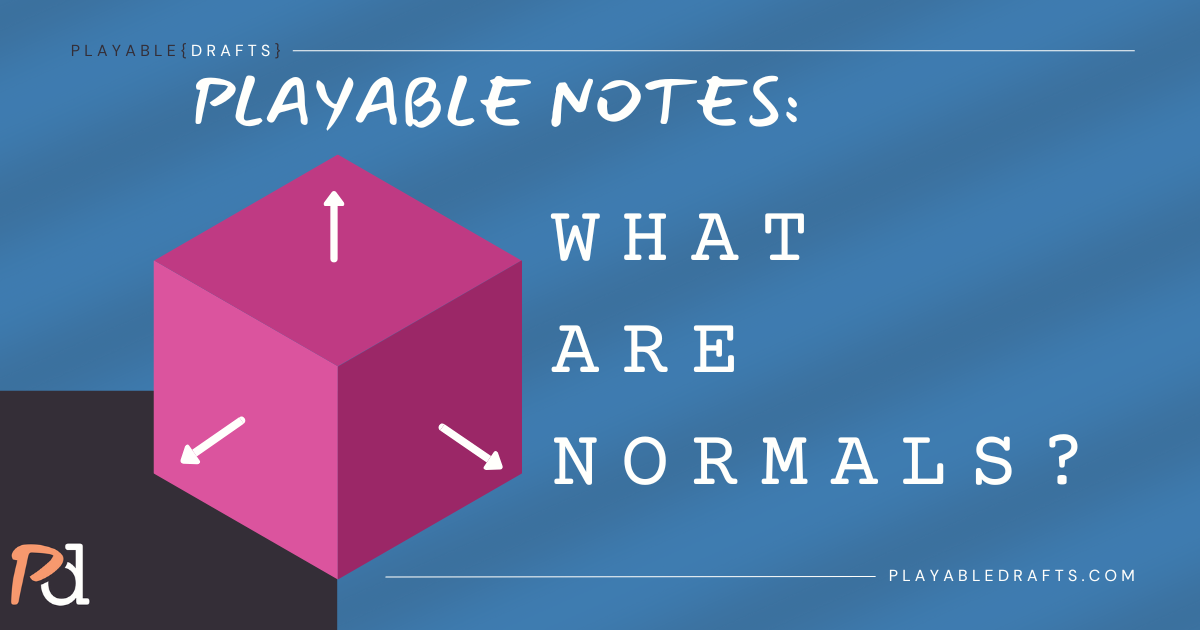
Normals are simply a direction that shows which way a surface is facing. Usually, people visualize a normal by thinking of an arrow or straight line pointing out from the surface. You can see a simple example in the featured image above as well!
In the 3D space, they’re used to decide how light hits a surface and how it should look on screen. Where a normal’s “arrow” is pointing determines how bright the surface is. So, if pointed toward your program’s light source or object, that surface will be brighter. Without normals, shading and lighting wouldn’t work correctly.
There are three common references to normals you will hear: face normals, vertex normals, and normal maps. We will cover these in the next few sections.
Quick note: you’ll hear the phrase flipped normal or reversed normal a lot! These are the same thing, just different ways of saying it. A flipped, or reversed, normal is when the normal is facing the opposite direction that it should. Usually they’re inside out compared to all the faces next to it.
Face & Vertex Normals
A quick refresher: a polygon is a single flat face on a 3D model, and a vertex is a corner point of that polygon.
- Face normal: this is one arrow sticking out of the whole polygon face. It makes each polygon shade separately, which gives a faceted, low-poly style.
- Vertex normal: this is one arrow per corner. The arrows are averaged between surrounding faces, which makes light transition smoothly across the surface and results in smooth shading.

Why it matters: using face normals gives sharp, hard edges. Using vertex normals smooths the shading between faces. In most 3D software, toggling between flat shading and smooth shading is really just switching how face vs vertex normals are calculated.
Transforming Normals
This little side note is important to help you understand how 3D functions. This is just a note though, since game engines typically fix it automatically… Whenever you move or scale a 3D model or its parts, the normals must be adjusted too. If scaling were to be uneven, normals could get distorted and give weird lighting and shading results.
Basically, imagine a normal’s location didn’t move when your mesh did… The engine would think the light is hitting the old position, not the new one. It would interact really strangely!
Back-Face Culling
As the heading suggests, the back of a face is removed from rendering when faced away from the camera. It doesn’t need to be drawn in this case, and this helps make rendering faster. This is why reversed, or flipped, normals can cause problems; the computer might think the surface is facing the wrong way. Your shading will show up strange when you run into this issue – but don’t worry, most 3D software has easy ways to flip them back around.
Normal Mapping
Were you like me, where you used normal maps, not understanding them or normals in general?
Now that you understand how normals work, you can start to understand a normal map. It is a texture map that stores extra directional information to fake shading and lighting details. It’s very common to use for adding small bumps that look real when the surface is actually flat. This keeps models efficient and lower poly while looking detailed.
If you’re a fan of the analogies so far, try to think of it this way. A normal map is a method to direct the normal’s arrows and light directions in order to fake shading on a texture.
Why Artists Should Care
Even though 3D art leans more technical than traditional art, the fundamentals of the latter still apply. Normals are important because they capture your model’s appearance through smoothness, shading, and details. They directly affect how your models look, especially under lighting. They can make a low-poly model look smooth (even when it’s technically not), add surface details through normal maps, and help keep assets efficient.
Resources & Future Deep Dives
Did you know that normals are incredibly complex? There is a lot of math and logic involved. This Note focused on the basics of normals. Advanced topics like weighted averaging methods, tangent spaces, and matrix math are also important, but we’ll dig into those in a future Playable Note!
If you’d like to look into more complex topics now, check out these amazing free resources. Some of them fully dive into normals, but others have sections you need to scroll to:
- Scratchapixel: Shading Normals
- LearnOpenGL: Basic Lighting
- LearnOpenGL: Normal Mapping
- Wikipedia: Normal Mapping
- Andy Green: Cross Product for 3D Artists
In Conclusion (With Mini Challenge)
Normals can feel intimidating at first, but now you know they’re simply directions that tell light how to interact with a surface. From flipped normals to normal maps, they’re at the heart of how your models look and feel. There is so much more to this topic, however I hope that simplifying it down to the basics can help anyone better understand. If this Note helped clear things up, share it with a fellow artist who might also be struggling with the basics!
Mini challenge: Open up one of your older models. Turn on normal visualization in your 3D program and see what the arrows are doing. Just being aware that 1. this feature to visualize exists, and 2. how your surfaces are functioning, can help you fundamentally understand the underlying systems as you’re creating!
Playable Drafts content is always evolving. It was created with the mission of always designing, iterating, and learning in public together.
Please share feedback on our Discord or submit a resource to grow the Resource Library.
If you’d like to help fund free resources for everyone, you can support us on Patreon.
We only use your email for PD updates. Unsubscribe any time.